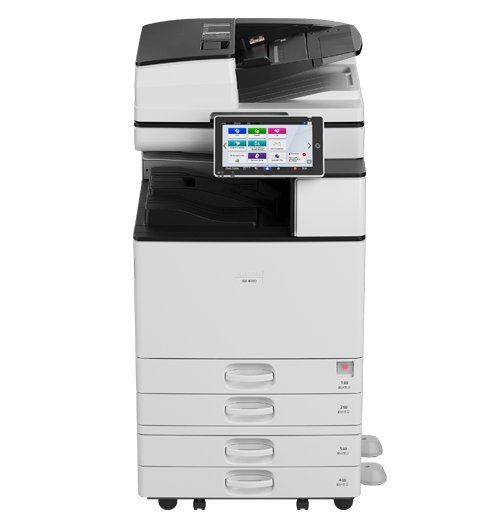
IM 4000 Black and White Laser Multifunction Printer
Boost productivity with smart multifunction performance
Prints up to 40 ppm, copy, scan, fax (optional)
1200x1200 dpi max print resolution
Paper capacity up to 4,700 pages
Simplify tasks and expedite workflows with on-demand apps
Drivers |
Request a Quote
Boost productivity with smart multifunction performance
Be ready for emerging document management challenges. Use RICOH Always Current Technology to upgrade the capabilities of the IM 4000 Black and White Multifunction Printer in moments without technical help. Simply download apps and apply upgrades as they become available. You'll have the most recent advanced imaging technologies at your fingertips for more long-term value from your investment.
Streamline the way you work
Handle everyday tasks with speed and precision — opt for cloud-based RICOH Smart Integration Solutions to automate a wide range of printing, copying, scanning and faxing tasks. Add efficiency without capital expense, special software or additional servers. Simply choose from a wide range of solutions to enhance how you scan, email, download, organize and share files.
Print with more freedom and confidence
Promote a smart, safe and productive office with contactless printing. Use the Ricoh Smart Device Connector app, AirPrint® or Mopria® to grab files and print directly from your personal mobile device. With the Smart Device Connector app, Android users can place their smartphone or tablet near the embedded NFC tag to get started, and iOS users can scan the QR code. No utilities. No drivers. No software.
Expedite everyday document tasks
Work quickly with print speeds up to 40 pages per minute (ppm) on paper sizes up to 11" x 17". With the 220-Sheet Single Pass Document Feeder (SPDF), you can scan up to 240 images per minute (ipm) and share them via multiple Scan-To capabilities to send contracts, invoices and other important documents directly to email inboxes. Optional Large Capacity Trays expand paper capacity to 4,700 sheets for fewer interruptions and multiple paper sizes.
Optimize uptime with smart support
Use RICOH Intelligent Support* to improve everyday maintenance and avoid downtime. You'll receive an alert when the IM 4000 needs service. Request technical help from the control panel with the Service Request App. Use self-help How-to-Videos, User Guides and Web Help tools for your own troubleshooting. When you need help from the pros, use RemoteConnect Support — and Ricoh technicians can access your Smart Operation Panel remotely.
*When enabled, internet connection required.
Make security a priority
Protect your work in shared-use schools and offices. User Authentication prohibits unauthorized users from accessing the IM 4000. Users must log in via passcodes or billing codes. You can also set print quotas and hold jobs until released by the authorized user. Update remotely, track usage and issue charge-backs via RICOH Streamline NX. Proven encryption tools on the hard drive offer additional protection from other threats and oversights.
Tap into personalized precision
Enjoy modern, effortless convenience with the highly intuitive and responsive 10.1"-wide Smart Operation Panel. With precise touchscreen control, you can put the information you need most front and center to move deftly between tasks. Download apps and widgets for one-touch workflows. Browse online for content, store it in popular cloud services, and share it with any audience at any time from the control panel.
Create a professional, finished look
Use our automated finishers to impress audiences with a professional look for your presentations, handouts and manuals. Take your pick from a 1,000-sheet staple or stapleless Hybrid Finisher, 3,000-sheet Finisher, 1,000-sheet Booklet Finisher or 500-sheet Internal Finisher for faster stacking, stapling, punching and folding. Add four diverse folding types with the optional Multi-Folding Unit.
Put your energy to good use
The IM 4000 is ENERGY STAR® certified and EPEAT® Gold Rated* with a Typical Electricity Consumption (TEC) value of 0.45 kWh/week. Program it to shut down when the office is closed to save energy costs. The Eco-Friendly Indicator tracks paper savings. Encourage recycling via the Ricoh Cartridge Return Program.
*EPEAT Gold rating is applicable only in the USA.
Need more information?
Learn more about the RICOH IM 4000 Black and White Laser Multifunction Printer and how it may fit your business.